An add-on is a part of Ziira, such as Purchasing or Payroll. Your starting set switched some on.
Steps
-
Click Add-ons in the left menu.
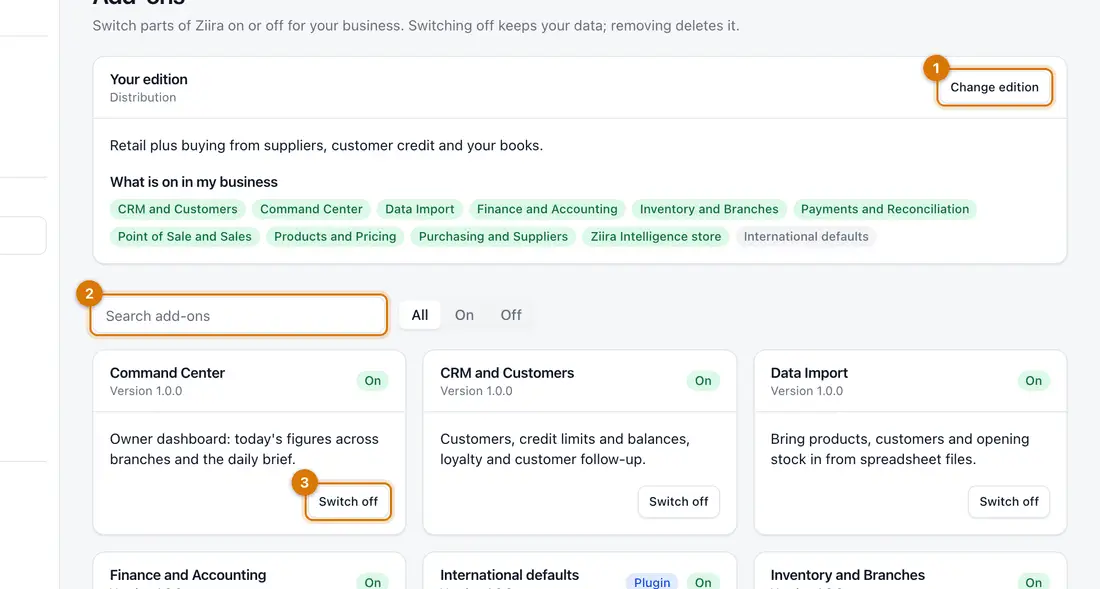
- Your edition and Change edition
- Search and the All, On, Off filter
- An add-on card
You should see: Your edition at the top, What is on in my business, and a card for each add-on marked On or Off.
-
To move to a bigger set, click Change edition, click the set you want and click Switch edition.
You should see: A list of what will be switched on. Nothing you have is switched off or deleted.
-
To switch one add-on on, find its card and click Switch on, then click Switch on again.
You should see: Its screens and menu items appear. If a card says Needs, that add-on is switched on with it.
-
To switch one off, click Switch off on its card and confirm.
Your data is kept. Remove data deletes it for good, so Ziira asks you to type the name first.

If something goes wrong
An add-on will not switch off
Another add-on uses it. The card says Used by. Switch those off first.
A menu group disappeared
Its add-on was switched off. Switch it on again and your data is still there.
I do not see Add-ons
Your role does not allow it. Ask the owner.
Still stuck? See Fix common problems.