The daily summary lists yesterday's figures and the few things that need you.
Steps
-
Click Intelligence > Daily summary.
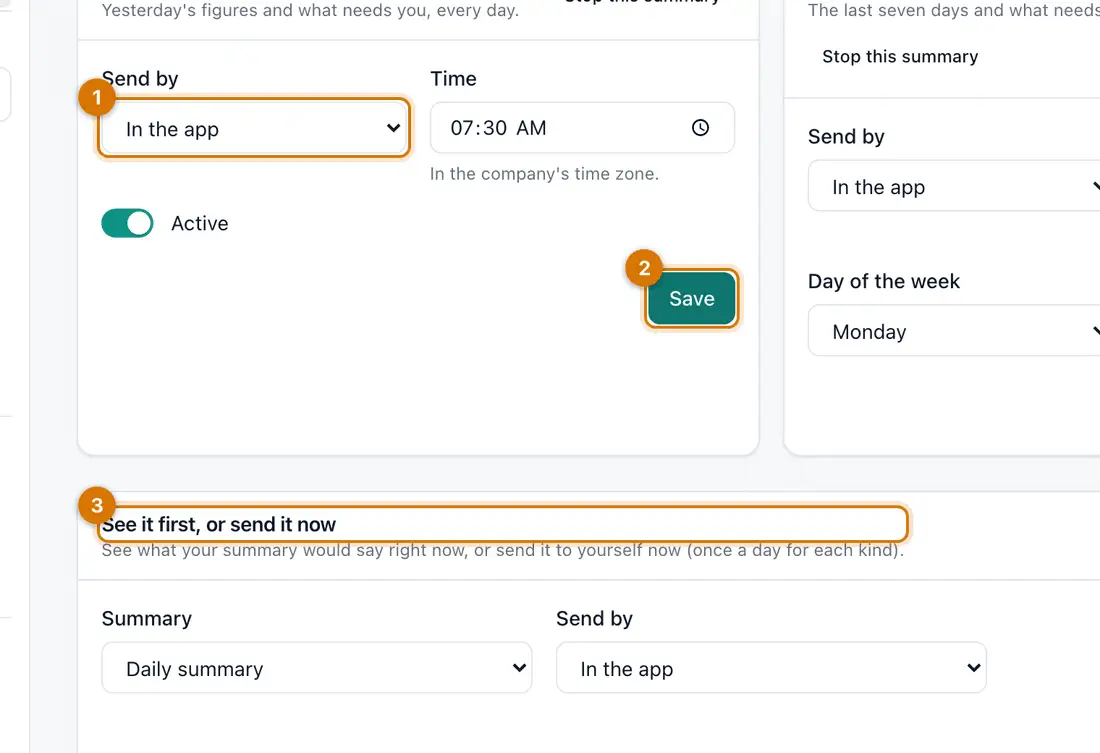
- Send by and Time
- Active and Save
- See it first, or send it now
You should see: Settings for a daily and a weekly summary.
-
Under Daily summary choose Send by, then set the Time.
-
Make sure Active is on, then click Save. Do the same for the Weekly summary.
-
To see one now, go to See it first, or send it now and click Show preview.
-
Click Send now to send yourself a copy.
You should see: Past summaries are listed under Summaries sent to me.

If something goes wrong
Nothing arrives by SMS or email
The channel is not set up, or your number or email is missing. Check Settings > Email and SMS.
The time is wrong
Summaries use your company's time zone. Check it in Settings > General.
Still stuck? See Fix common problems.