Before you start
- The supplier and the products are already added.
Steps
-
Click Buy > Purchase orders, then New order.
You should see: The New order page, with Order details and Lines.
-
Click Choose a supplier and pick one. Check the Order date, set Expected on, and choose Deliver to.
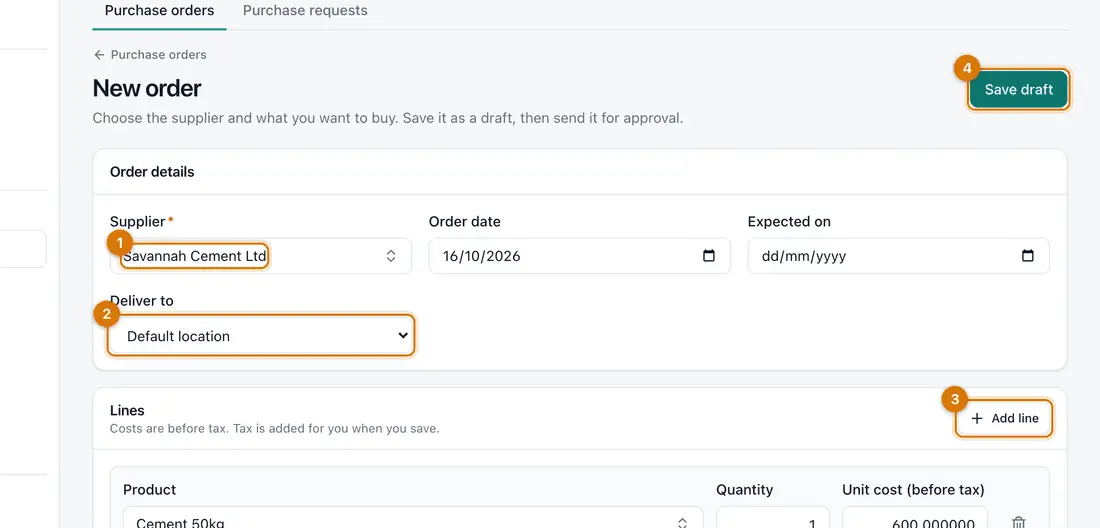
- Supplier
- Deliver to
- Product, quantity and cost
- Save draft
-
Under Lines, click Choose a product. Type the Quantity and the Unit cost (before tax). Click Add line for more products.
-
Click Save draft.
You should see: The order opens as a Draft with a number such as PO-000001. Nothing is ordered yet.
-
Click Submit for approval.
You should see: The order becomes Approved. A large order may wait for someone else to approve it.
-
Send the order to the supplier yourself (print it or use your usual way). Then click Mark as sent.
Ziira does not send the order to the supplier.

If something goes wrong
My order is waiting for approval
Someone else must approve it under Waiting for you in the left menu. You cannot approve your own.
I want to change an order
While it is a draft, click Edit. After approval, ask your approver.
The supplier's cost is different from the quote
Type the cost you agreed. Ziira flags bills with a different price.
Still stuck? See Fix common problems.