An expense is paid at once. For a supplier's invoice you pay later, use Supplier bills.
Steps
-
Click Money > Expenses, then New expense.
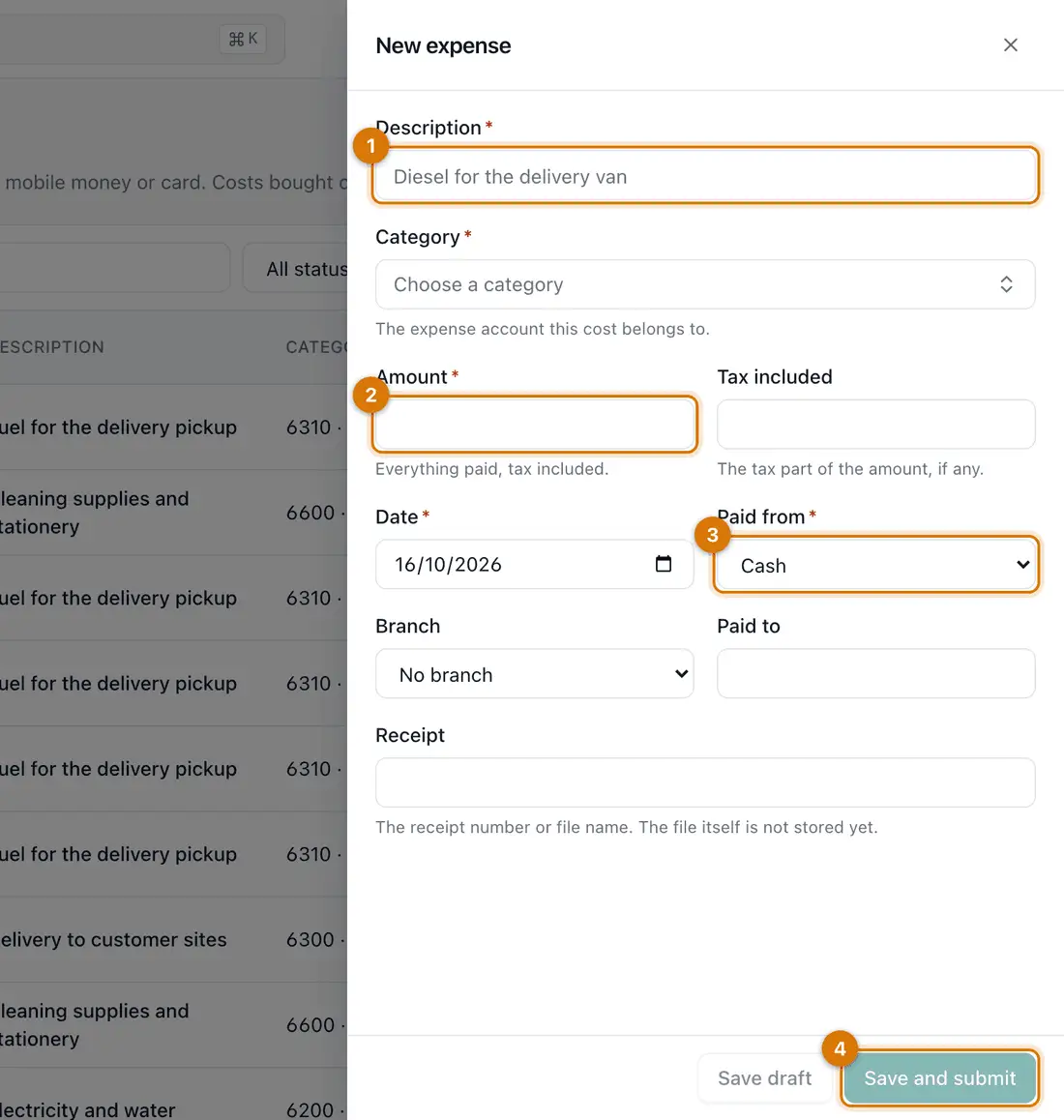
- Description and category
- Amount and date
- Paid from
- Save and submit
-
Type the Description. Click Choose a category and pick one.
-
Type the Amount, tax included. If the amount has tax in it, type that part in Tax included. Check the Date.
-
Choose Paid from: Cash, Bank, Mobile money, Card or Other. Choose the Branch, if any.
-
Type who it was Paid to and the Receipt number.
-
Click Save and submit to post it. Or click Save draft to finish later.
You should see: The expense appears in the list. A large one may wait for approval.

If something goes wrong
The category I need is missing
Categories are accounts. Add one under Money > Accounting > Chart of accounts, or ask your accountant.
I entered the wrong amount
While it is a draft, edit it. Once posted, open it and click Reverse expense, then enter it again.
I paid from my own pocket
Choose Other in Paid from and say so in the Description. Ask your accountant how to pay it back.
Still stuck? See Fix common problems.