How Intelligence works, step by step
Every day Ziira checks your records and tells you what looks wrong, with the proof. Here is how, in six steps.
On this page
- Six steps, from your records to a decision
- What it checks, with the number of checks
- What you get each morning
- What it never does: it never moves money
Imagine an accountant who never sleeps
Picture a careful accountant who, every night after you close, goes through every sale, every cancelled receipt, every stock count, every payment and every bill, in every branch.
Not once a month. Every night. And when you walk in the next morning, there is a short note on your desk.
- Ruiru: a cashier cancelled 14 sales after 9pm. Usually 2.
- The cement supplier's price went up 17% on your last order.
- Mary Wanjiku's invoice is now 45 days late.
- Thika banked KES 12,000 less than it sold.
An example note, made up for this page
You did not ask for any of it. You did not dig through a report. You read four lines, and you knew exactly where to look.
That accountant is Ziira Intelligence.
-
Ziira reads your records
It reads your sales, stock, money and staff records.
They come from Ziira itself, or from the bank and mobile-money statements and sales files you upload. Ziira can also read ERPNext, Odoo, Zoho Books and QuickBooks Online.
On anything you connect or upload, Ziira only looks. It never changes anything in it.
Result: The records the checks need are in one place.
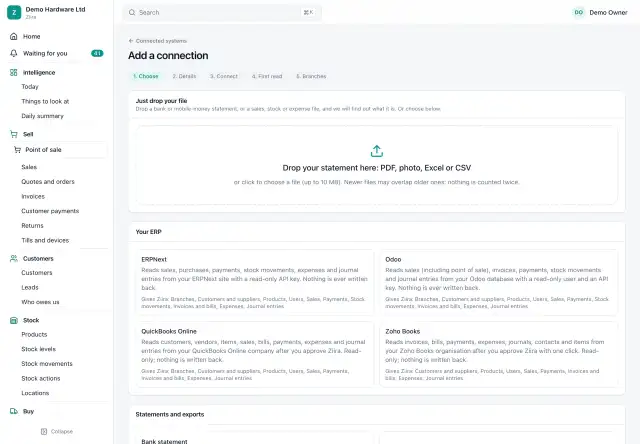
Adding a system or a statement (demo data) -
It checks them against your normal
Ziira runs its checks by itself every six hours, including overnight.
It compares each record with what is normal for you, not with one rule for everyone. A busy branch and a quiet branch get different limits.
Examples: cashier cancellations, cash against sales, stock that vanished, late customers, supplier price jumps, odd accounting entries.
Result: Each check says clearly: normal, or worth a look.
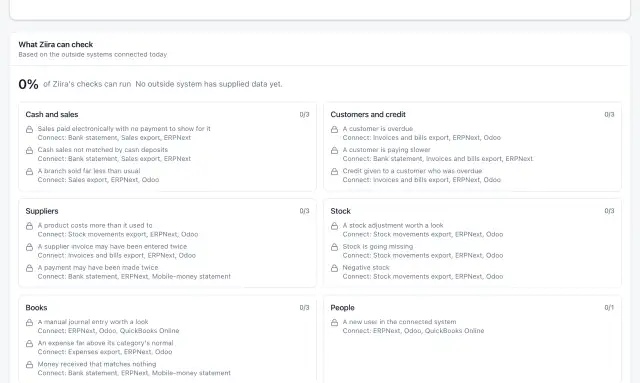
What Ziira can check (demo data) -
Anything wrong becomes a thing to look at
A check that finds a problem creates a thing to look at. It says how urgent it is, how much money is involved, and what to do next.
It also shows the proof: the exact sales, stock moves or entries behind it.
You find them under Things to look at in the app.
Result: One clear card with the proof, not a long report.
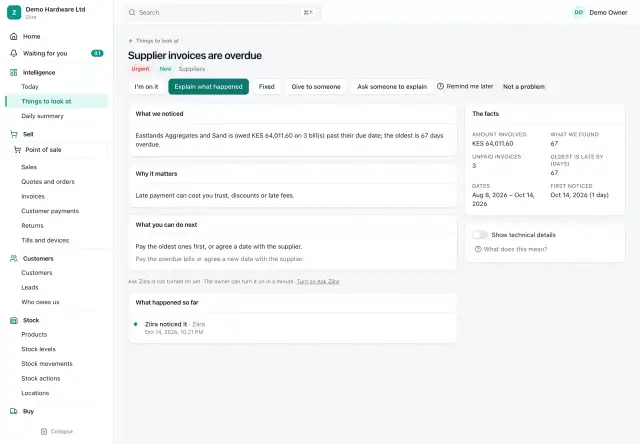
A thing to look at, with its proof (demo data) -
Every morning you get a short summary
It lists yesterday's main figures and the few things that need you, most important first.
You see it in the app and by email, SMS or WhatsApp.
Urgent things can reach you the same day.
Result: Two minutes with your morning coffee tells you where to look.
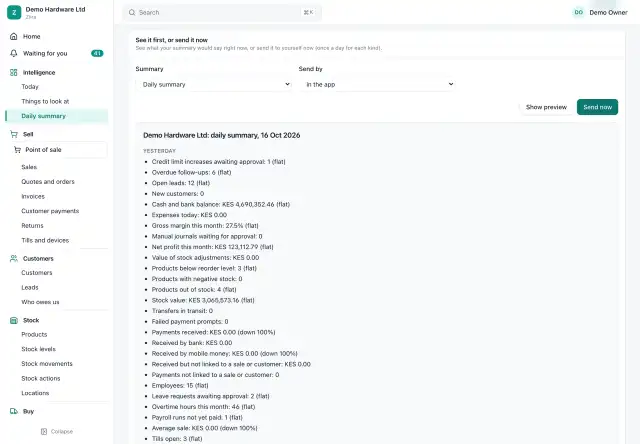
The daily summary (demo data) -
You look, hand it on, or say it is fine
Open a thing to look at and read the proof.
Then give it to someone, ask a manager to explain, or choose Not a problem.
A closed one does not come back unless something new happens.
Result: Every answer is recorded with who gave it and when.
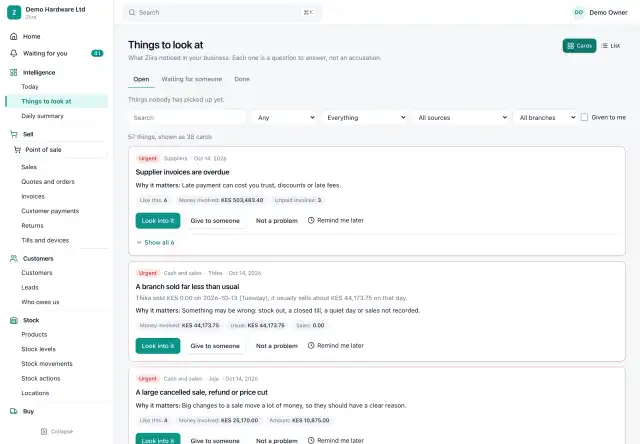
Everything to look at, most important first (demo data) -
Optional: let Ziira do routine jobs
You can let Ziira prepare drafts, send reminders to late customers, or do routine jobs for you.
You choose how far it goes, and you set the limits. Every business starts at report only.
Ziira never moves money.
Result: The routine jobs you allow get done, and each one is recorded.
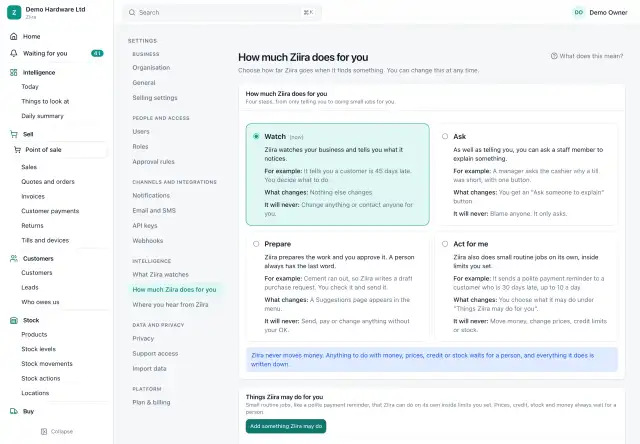
Choose how much Ziira does for you (demo data)
What it checks
90 checks in 8 areas. 68 run on Ziira itself and 22 on a system you already use.
- Cash, sales and payments 15Is the money you should have received actually there?
- Cashiers, discounts and the till 12Do the habits at the till look normal?
- Stock and shrinkage 15Is stock going missing, running out or going to waste?
- Customers and credit 11Who owes you, and are you lending to the wrong people?
- Suppliers and purchasing 12Are you paying more, paying twice or paying for goods that never came?
- Accounting and books 13Do the entries in your books look ordinary?
- People and payroll 8Is anyone being paid in a way that looks odd?
- Controls and approvals 4Is the system itself being used in a careful way?
Frequently asked questions
Does Intelligence change anything in my system?
No. On anything you connect or upload, it can only look. Every business starts at report only, which changes nothing.
Is the AI making up the numbers?
No. Totals and gaps are worked out from your records. The AI helper only writes sentences, it is off until an Owner agrees, and an answer with a number it cannot trace to your records is thrown away.
How long before the alerts are useful?
Expect some wrong alerts in the first weeks. Ziira reads past months to learn your normal, and you can change the limits.
Add daily checking to the system you already use
Keep your current system, let Ziira look at it, and get a daily check of what needs attention.