Solutions · Multi-branch

Multi-branch: see every branch without being there

The more branches, the more the owner depends on what others report. Ziira gives each branch its own numbers and gives you the comparison.

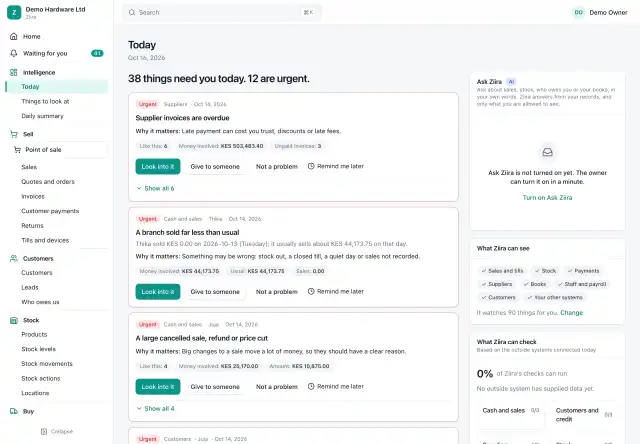
The Ziira Today page for a demo hardware business: a sentence saying how many things need you, the most urgent things to look at as cards with Look into it, Give to someone, Not a problem and Remind me later, and an Ask Ziira box
Today: what needs you, most urgent first (demo data)

What changes with several branches

  • The Today page and Home show the pulse by branch: sales, cash received, stock, receivables, payables and expenses.
  • Branch managers see only their branch; the owner sees all.
  • Stock transfers move through an in-transit step.
  • Each branch closes its day, and payments are matched per branch.
  • Alerts carry a branch, so the right manager is asked to explain.

On your phone

Daily briefs and urgent alerts go to the channel each person chooses, including WhatsApp if you add that option. See WhatsApp.

Already have an ERP in each branch?

Intelligence on your existing system can read it and map the system's branches to yours.

Choosing software

See how to choose POS software for a multi-branch shop.

Start with what you need today

Choose the whole business system, or only the daily checking, when you create your business.