Looking only, never changing
- Ziira only ever looks. It never writes to, edits or deletes anything in your system, and a file you upload never connects to anything.
- Access is a separate key or approval made just for Ziira, which you can take back at any time. Nobody shares a password.
- Keys are stored encrypted, never shown again, and kept out of logs.
- A file you upload is read and its lines are kept for checking; the file itself is not kept.
More in the guide to connecting your ERP safely with read-only access.
Pick your source
Each page says what is read, how to create the access, what is checked and what is not.
ERPNext
Let Intelligence watch ERPNext with a view-only access key. See what is read, what is checked and the limits.
Read more →Odoo
Connect self-hosted Odoo (versions 14 to 17) to Intelligence with a view-only user and access key. What is read and the limits.
Read more →Zoho Books
Approve Intelligence in Zoho Books with read-only scopes. See what is read, plan-based limits and how to withdraw access.
Read more →QuickBooks Online
Connect QuickBooks Online to Intelligence. Only read queries are sent. See what is read, Intuit's fees and the honest permission note.
Read more →Bank statements
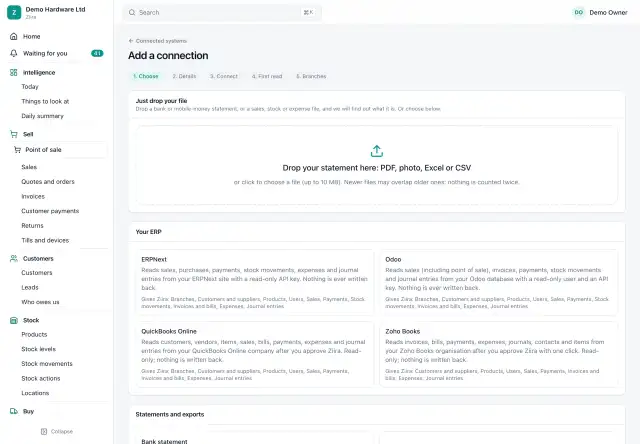
Drop a bank statement as PDF, Excel, CSV or a photo and Ziira works out the layout, then compares deposits with your sales.
Read more →Mobile-money statements
Upload a mobile-money statement (PDF, Excel or CSV) and Ziira matches transaction codes to your sales and flags what does not match.
Read more →CSV, Excel and PDF files
No connection? Drop a CSV, Excel or PDF export from your till, POS or accounting package and Intelligence checks it daily or on upload.
Read more →How it starts
- Choose "keep my system" when you register. You get Home, Intelligence, Connected systems and Settings.
- Add a connection: drop in a statement or an export file.
- Map the system's branches to your branches, or leave them at company level.
- Ziira reads, checks and starts sending alerts and briefs. Only complete days are judged, so a statement that ends early never makes a quiet day look bad.
What the checks cover
| Area | Examples of what is flagged |
|---|---|
| Cash and sales | Sales with no matching statement line; cash sales well above deposits; a branch far below its weekday normal |
| Controls | Unusual void, refund and discount rates per cashier; one large exception; sales at odd hours; sales entered days late |
| Customers | Overdue customers; credit to overdue customers; customers paying slower |
| Suppliers | Supplier price rises; duplicate bills and payments |
| Stock | Large, odd-hour or back-dated adjustments; shrinkage by product; negative stock |
| Books | Manual journals that are large, round, odd-hour, back-dated or self-approved; unusually high expenses; money received matching no sale |
| People | New users appearing in the source system |
A check whose data was never connected stays silent, and the What Ziira can check panel shows what can and cannot be checked today and which connection would switch more on.
What to expect
- What can be checked depends on what the source records. A till export without voids or discounts cannot show cashier habits.
- Files give daily data at best; connected systems are read on a schedule (daily unless you change it).
- Matching a statement line to a sale uses the payment code, or else the amount and time. It is not always one-to-one, and works as well as your system records payment codes.
- On a connected system expect reporting and follow-ups (levels 1 and 2). Prepared and automatic actions (levels 3 and 4) work only on data in Ziira itself.
Moving to Ziira later
If you later move to Ziira, a guided step proposes products, customers, suppliers, opening stock and balances from what Ziira has already read, checks them, and lets you undo the opening balances. Nothing is ever deleted automatically.
When both run
If Ziira itself runs the same area as a connected system, the old system's check for that area stays quiet for that branch, and the app offers to pause the connection or keep both. Every alert says where it comes from.
Frequently asked questions
Do I have to switch my POS or ERP?
No. That is the point of using Intelligence on your existing system. You can move to Ziira later if you want to.
What about SAP Business One or Sage?
They are not supported yet. Older systems that can export reports can use the file route.
Does it work with no system at all?
Yes, with the bank and mobile-money statements and a sales export. Checks cover cash, sales and basic stock.