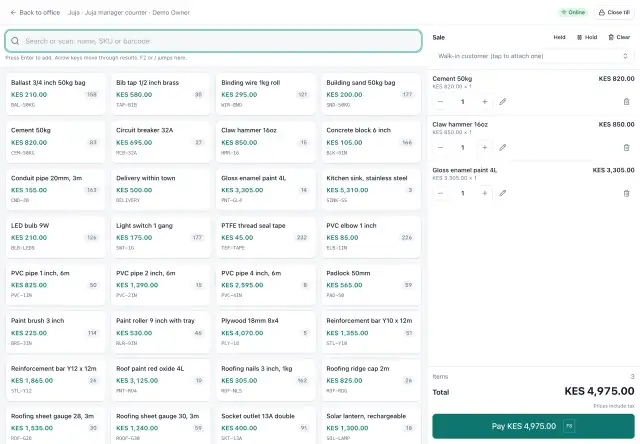
At the counter
- Scan barcodes or search products; hold a sale and resume it later.
- Cash, card slip and mobile-money payments, with the payment code recorded against the sale.
- Credit sales to customers within their credit limit.
- Prices come from your price lists; only people with the price-override permission can change a price, and a reason is required.
- Receipts with your header and footer.
Tills and cashiers
Each cashier works in a till session at a branch. The session records who sold what and when, so the day's cash can be closed per branch and compared with what the payments say. Returns, voids and discounts above your policy need a reason, and where you have set approval limits, an approval.
Selling offline
The web terminal keeps working with no network. After one online visit it loads from the device; a copy of the branch's products, prices, customers and reasons lives on the device and refreshes every few minutes while online.
Sales made offline are saved on the device first and sent when the connection returns. Each sale has a client-made id, so a lost reply or a reload can never produce a double sale. A sale the server cannot accept is never dropped: it waits in a "needs attention" queue with the reason.
Opening or closing a till, mobile-money prompts, credit on account (the limit must be checked), returns and voids of already-sent sales need a connection.
What happens behind each sale
When a sale is completed, stock goes down at the right branch at the right cost, the books are updated, and payments can be matched to it. Nobody types anything twice.
Because everything is recorded with a user, a till and a time, Intelligence can flag cashiers whose void or discount rate is unusual compared with their own normal. See the guide on spotting cashier voids and discount abuse.
Sales documents
Besides counter sales there are quotations, sales orders, invoices, customer payments, refunds and credit notes, which is how a distributor sells on credit. See customers and credit.
Frequently asked questions
Can I use it on a tablet or old PC?
The till runs in a web browser, so any device with a modern browser can open it. Offline selling needs a browser that supports local storage for the device copy; the terminal tells you if it cannot and refuses to sell offline rather than risk losing sales.
Does it print receipts?
Receipts can be printed from the browser using your receipt header and footer.
What if two cashiers sell the last item?
Stock balances are locked when a movement is posted. Whether stock may go negative is a policy the business sets.