Before you start
- The customer is already added.
Steps
-
Click Customers > Customers, open the customer and click the Credit tab.
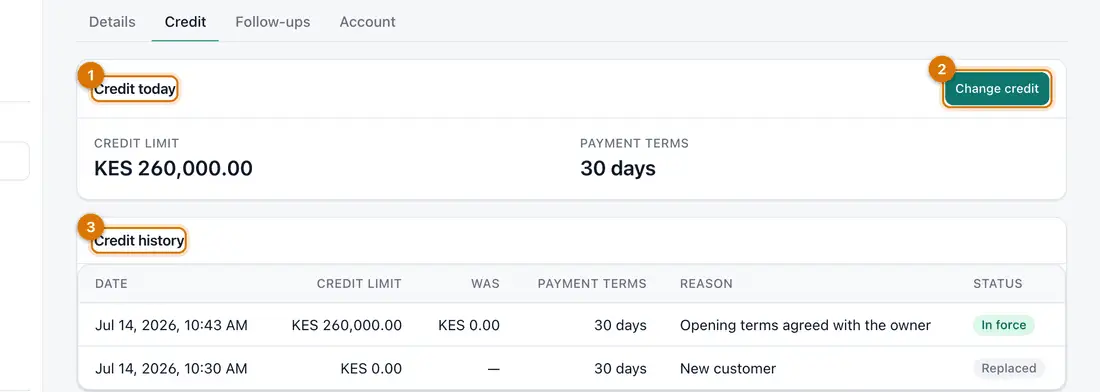
- Credit today
- Change credit
- Credit history
You should see: Credit today shows the Credit limit and Payment terms. Credit history is below.
-
Click Change credit.
-
Type the new Credit limit and the Payment terms in days. Write the Reason. Click Submit.
You should see: Credit updated. The new line shows as In force in Credit history. The old one shows as Replaced.
-
To see how much room is left, open the Account tab.
You should see: Owes, Overdue, Credit limit and Credit available, with the customer's statement.

If something goes wrong
My increase is waiting
Raising a limit needs a finance manager's approval, under Waiting for you in the left menu. Lowering a limit applies at once.
A credit sale was refused
The sale would put the customer over their limit. Take a part payment first, or change the limit.
I lowered the limit below what they owe
That is allowed. It does not change what they owe. They just cannot buy more on credit.
Still stuck? See Fix common problems.