Ziira works out the cash that should be in the drawer. You enter what you counted and it shows the difference.
Steps
-
Click Sell > Tills and devices and click the open till.
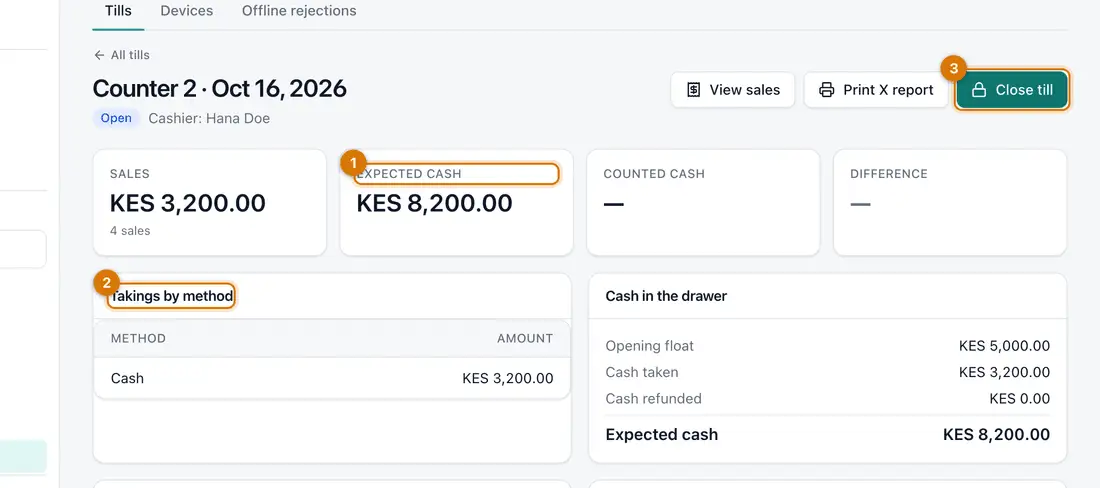
- Expected cash
- Takings by method
- Close till
You should see: The till's page with Sales, Expected cash, Takings by method and Cash in the drawer.
Print X report prints a summary without closing.
-
Count the cash in the drawer, including the opening float.
-
Click Close till. In Counted cash type the total you counted. Click Close till again.
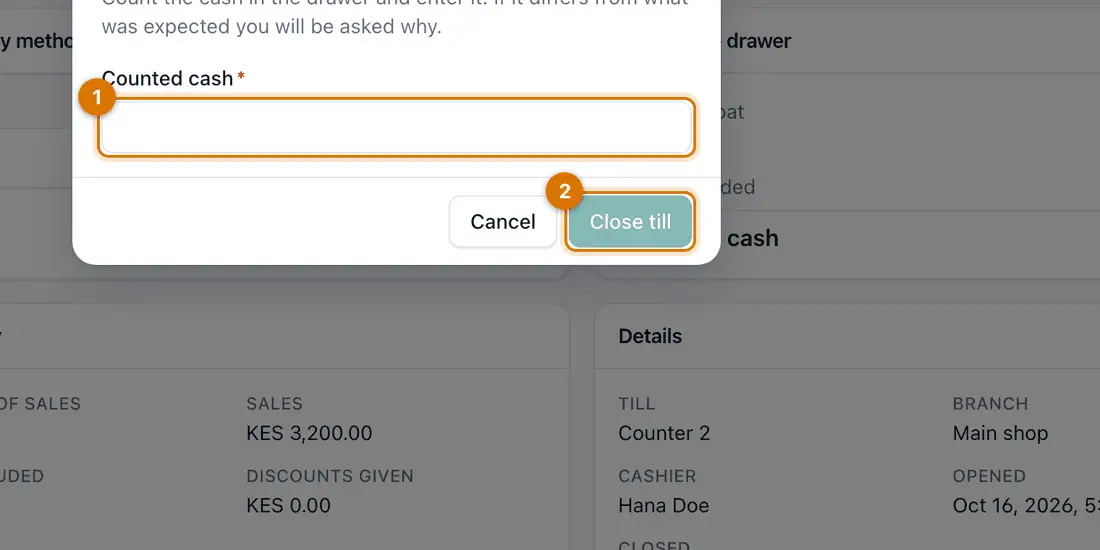
- Counted cash
- Close till
You should see: The till is Closed. The page shows Counted cash and the Difference: zero when the drawer matched.
You can also close from the till screen itself.
-
A manager then closes the day. Click Money > Payments, open the Daily close tab and click Close a day. Choose the Branch and Day, enter the Cash banked and click Close and lock the day.
You should see: The day is locked. Anything that stops it closing is listed first.


If something goes wrong
There is a difference
Recount. Then look at Sell > Sales for that till, including voids and returns. Do not change the count to hide it.
Close till is refused
Sales are still waiting to be sent from an offline period, or you may not close this till.
I forgot to close yesterday's till
Open it from Sell > Tills and devices (set the Business date) and close it with that day's count.
Still stuck? See Fix common problems.