Before you start
- Permission to close periods. Ask your accountant or finance manager.
Steps
-
Click Money > Payments, then the Daily close tab. Look for days that are not closed.
-
Enter all supplier bills and expenses for the month.
-
Finish your bank and mobile money reconciliations.
-
Open Money > Financial reports. Read the Profit and loss, Balance sheet and Trial balance.
-
Click Money > Accounting, then the Periods and rules tab.
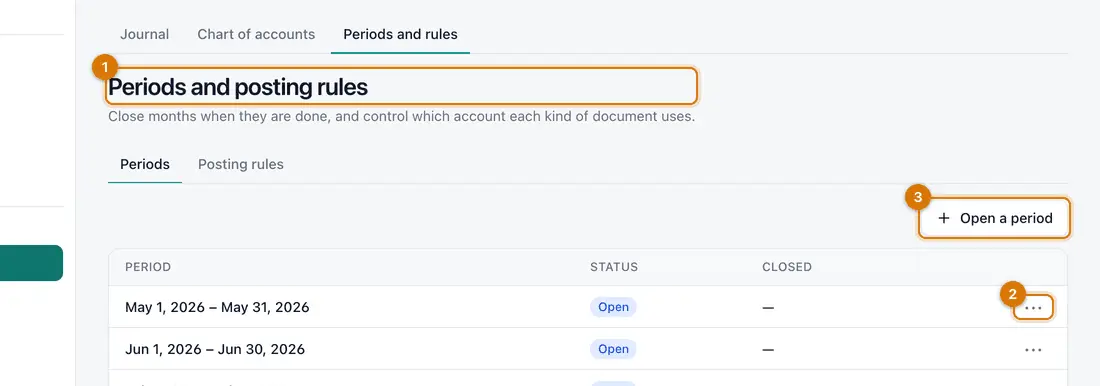
- Periods
- The ••• menu
- Open a period
You should see: A list of monthly periods and whether each is open.
-
On the month's row, click •••, choose Close period, then confirm.
You should see: The period shows as closed.
-
When your accountant is happy, choose Lock period from the same menu.
A locked period can never be reopened.

If something goes wrong
The period cannot be closed yet
Ziira lists what is in the way, such as a journal waiting for approval. Fix that, then try again.
There is no period for the next month
Click Open a period and choose any day in that month.
I closed too early
Ask someone with permission to choose Reopen period. This works only before the period is locked.
Still stuck? See Fix common problems.