The business sets the default. Each person can choose their own way.
Steps
-
The owner clicks Settings > Where you hear from Ziira.
You should see: The Urgent alerts section.
-
Choose Send urgent alerts by and What counts as urgent, then click Save.
Anything less urgent waits for the daily summary.
-
To set your own choice, click your name at the top right and choose My account.
-
Under Notifications choose how you get Urgent alerts, Daily summary and Things to approve.
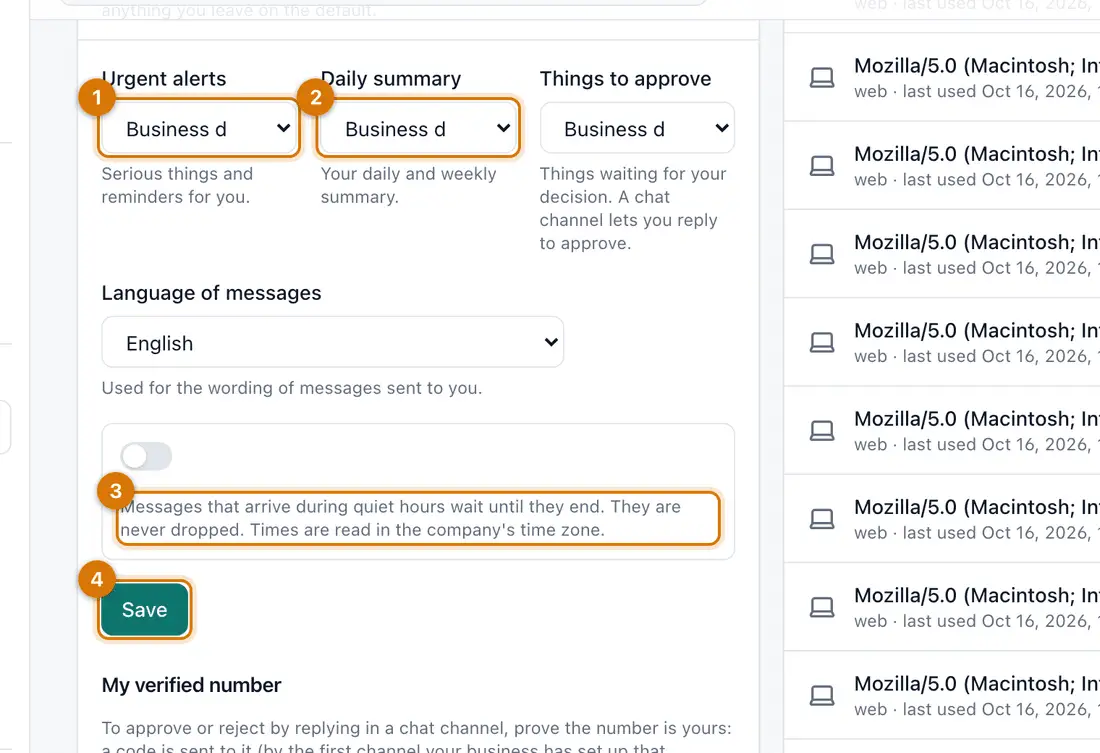
- Urgent alerts
- Daily summary
- Quiet hours
- Save
-
Turn on Quiet hours, set Quiet from and Until, and choose whether to Let critical alerts through.
-
Click Save.
You should see: Messages sent in quiet hours wait until they end. None are dropped.

If something goes wrong
I get no alerts
Alerts may be off, the channel may not be set up, or your number or email may be missing.
I get too many
Choose Only the most urgent things under What counts as urgent, and use quiet hours at night.
Still stuck? See Fix common problems.