A return takes some goods back. A void cancels a whole sale. Both keep a record with the reason.
Steps
-
Click Sell > Sales and click the sale. Search by Receipt number if you have it.
You should see: The sale's items, payments and totals.
-
To take goods back, click Return goods. In Returning type how many of each item come back. Choose the Reason.
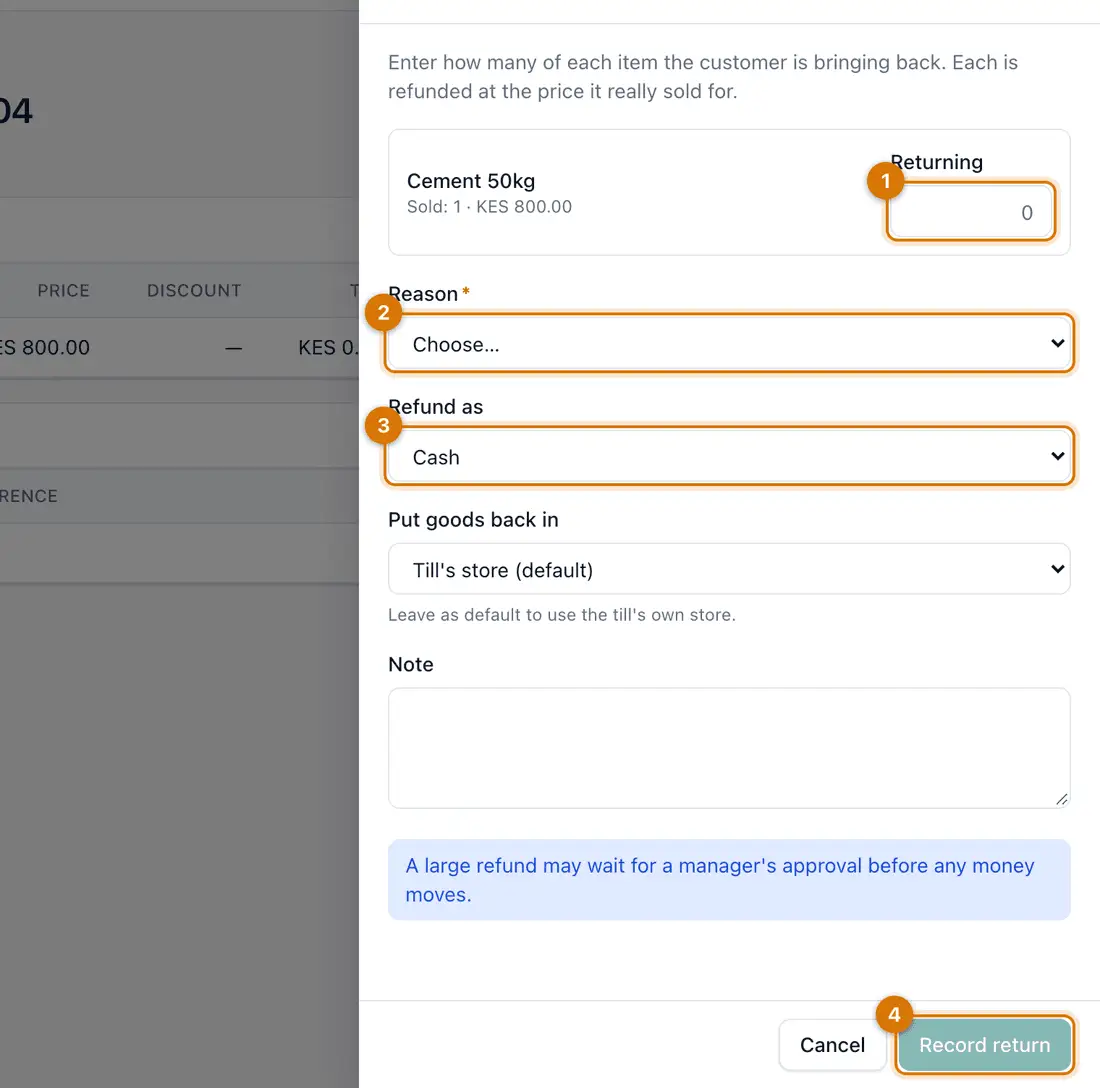
- Quantity returning
- Reason
- Refund as
- Record return
-
Choose Refund as: Cash, Mobile money, Exchange or Credit on account. Choose where the goods go in Put goods back in.
-
Click Record return.
You should see: The goods go back into stock and the refund is recorded. Find the return under Sell > Returns.
A large refund may wait for a manager to approve it.
-
To cancel a whole sale instead, open it and click Void sale. Choose the Reason and click Void sale again.
You should see: The sale shows as voided. Stock and money are put right.
You can void a sale only while its till is open.

If something goes wrong
I do not see Return goods or Void sale
Your role does not allow it. Ask a manager or the owner.
The refund method I need is missing
Choose the closest one, such as Cash, and write the real method in Note.
I returned the wrong item
A recorded return cannot be edited. Record a new sale for the item.
Still stuck? See Fix common problems.